This blog post will cover the HTTP Retry process using a Groovy script and Looping process call combination. Sometimes, we get a temporary time out error on the HTTP endpoint. To tackle this, we can use this mechanism to do a http retry for a specific interval / specific number of times. Overall iFlow Design: Set Properties in Content modifier: For the Groovy script to work, we need to declare the below properties. Looping Process Call: HTTP Retry Groovy Script: If the HTTP Response code is greater than or equal to 400, the script will retry depending on the retry_interval and retry_limit properties. ------------------------------------------------------------------------------------------------------------- import com.sap.gateway.ip.core.customdev.util.Message; import java.util.HashMap; def Message processData(Message message) { def map = message.getHeaders(); def httpStatusCode = map.get("CamelHttpResponseCode") as In...
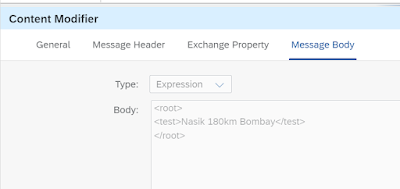
I had a requirement where in we wanted to extract the km value from a node value. Input XML Example: ------------------------------------------------------------------------------- <root> <test>Nasik 180km Bombay</test> </root> ------------------------------------------------------------------------------- XSLT Mapping used: ------------------------------------------------------------------------------- <xsl:stylesheet version="1.0" xmlns:xsl="http://www.w3.org/1999/XSL/Transform"> <xsl:output omit-xml-declaration="yes" indent="yes"/> <xsl:strip-space elements="*"/> <xsl:template match="/*"> <xsl:value-of select= "translate(.,translate(., '0123456789', ''), '')"/> </xsl:template> </xsl:stylesheet> ------------------------------------------------------------------------------- Output: ----------------------------...


Comments
Post a Comment