Posts

Showing posts with the label Monitoring

IDOC Search

Searching IDOC Content WE09  Search for IDocs by Content, searches in business database WE10 Search for IDoc in Archive In WE09, in the " criteria for search in data records " -  enter the segment name, field name and the value you want to search. It will list out all the idocs with the specific criteria you mentioned. AMOR FATI - LOVE OF FATE
SAP Batch Jobs

We can only run BTCTRNS1 if you do upgrades of your system. Run the program BTCTRNS1 in SE38. This resets the status of the jobs leaving RDDIMPDP unaffected. Released jobs will have a suspended status or cancelled for upgrade. BTCTRNS1 alters the status of jobs, if they are active and if it is critical to your system you should decide when to run the program. Make sure your system is ready for this. If they do not give any impact to your system then you can run the program. RDDIMPDP job that handles transport requests is unaffected when running the program. Basically,  BTCTRNS1 is for suspending your jobs and BTCTRNS2 is for resuming the suspended jobs. AMOR FATI - LOVE OF FATE

SM12

SM12 - LOCK MONITORING The SAP System is equipped with a special  lock mechanism  that synchronizes access to data on the database.  The purpose of the lock mechanism is to prevent  two transactions  from changing the same data on the database  simultaneously .  Lock entries are usually set and deleted  automatically  when user programs access a data object & release it again.  1.  You can use  SM12  to check and delete lock entries. 2.  In  SM12 , check any lock entry  older  >  2 days . If any outdated entry found, check the corresponding user is user  online / offline  in  AL08  or  SM04  (you can get the transaction code that been use by the user). Get the user contact from  SU01  and inform about the lock else if the user is  offline , release the table from lock by  deleting  the lock. Important profile pa...

CHARM TOOL

Image
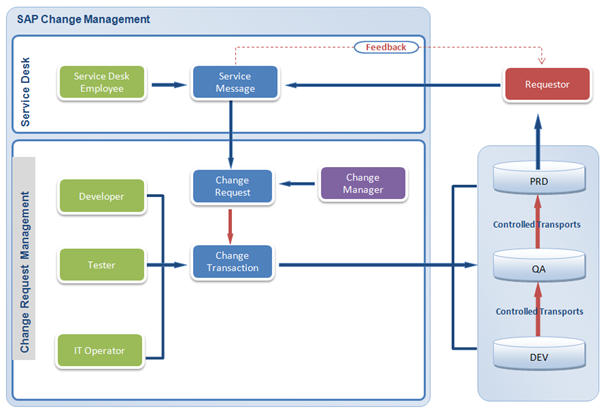
SAP ChaRM (Change Request Management) SAP ChaRM  is SAP Solution Manager based tool which provides tracking and documentation of all change requests and transports for business solution development in an organization. A typical  Change Request Process  is initiated by a business user via service help desk. Help desk assigns Change Request (CR) to respective manager where manager validates request to take further action. Manager validates if request is valid. Manager assures, change request is approved by business logically and financially. Manager assigns CR to developer and tracks all changes from DEV to PRD system. Standard Change Request Process for Development / Enhancements New Requirement / Correction request by the Business User This requirement is validated by the Change Manager The Change Manager provides information on effort, duration and cost for this CR After approval of the CR, the CR is accepted by the SAP Development Te...